

Resources
The Resources page provides a complete inventory of your cloud infrastructure across all connected providers. Every virtual machine, database, storage bucket, and Kubernetes cluster is discovered, categorized, and tracked with its associated cost.
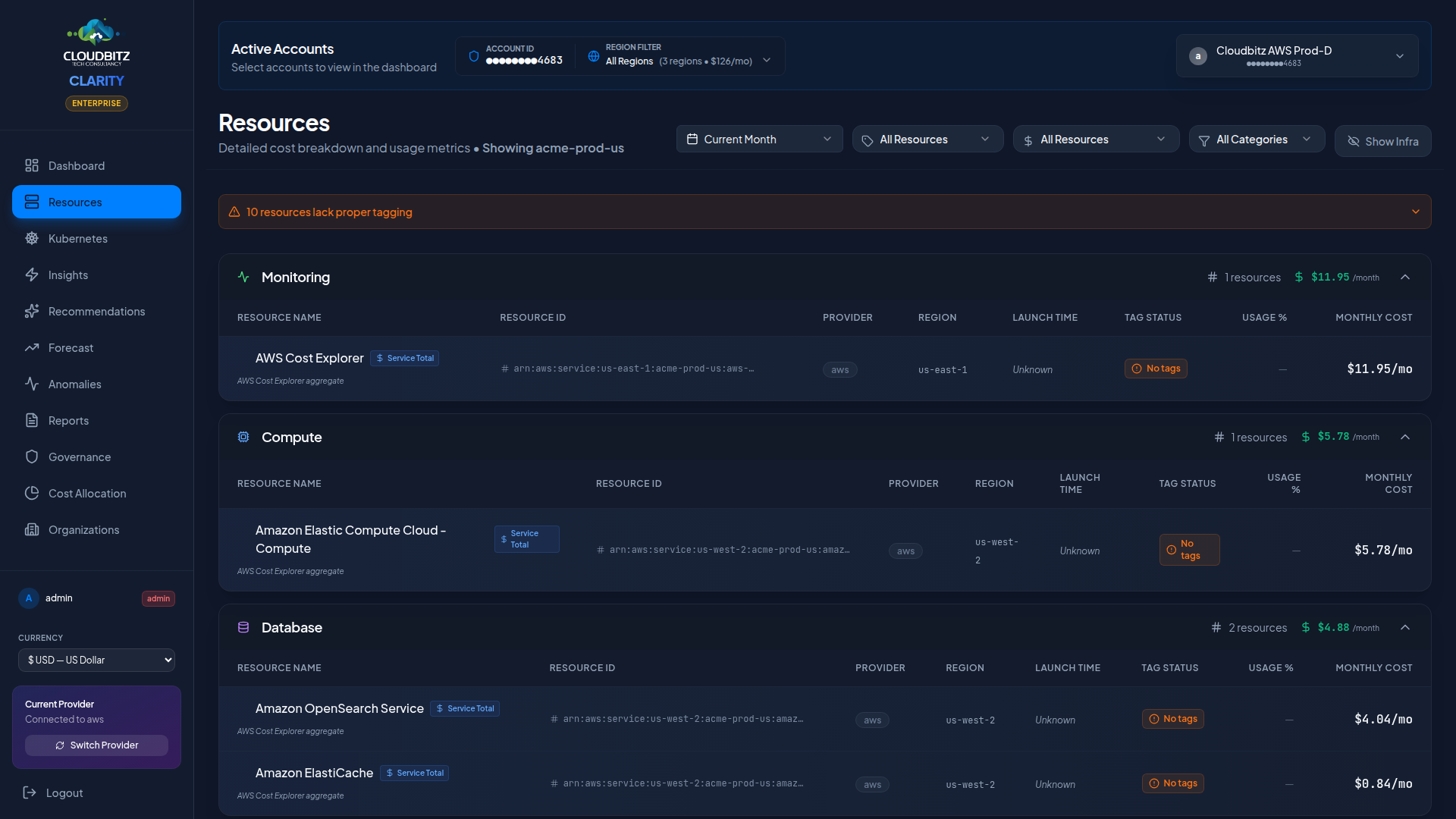
Resource inventory
CLARITY automatically discovers and catalogs resources from all connected cloud accounts. The inventory updates with each sync cycle, ensuring you always have an accurate picture of what is running and what it costs.
| Provider | Discovered Resource Types |
|---|---|
| AWS | EC2, RDS, S3, Lambda, ECS/Fargate, EKS, ElastiCache, DynamoDB, EBS, ALB/NLB, NAT Gateway, ECR, and more |
| Azure | Virtual Machines, SQL Database, Storage Accounts, AKS, Cosmos DB, Load Balancers, App Services, and more |
| GCP | Compute Engine, Cloud SQL, Cloud Storage, GKE, BigQuery, Cloud Functions, and more |
Resource hierarchy
Resources are organized in a parent-child hierarchy that reflects your actual cloud architecture:
- Account/Subscription/Project (top level)
- Service (e.g., EC2, Azure VMs)
- Individual Resource (e.g., a specific instance)
- Child Resources (e.g., attached volumes, network interfaces)
- Individual Resource (e.g., a specific instance)
- Service (e.g., EC2, Azure VMs)
This hierarchy makes it easy to understand how costs flow from individual resources up to services and accounts.
Filtering and search
By category
Filter resources by logical category to focus on specific infrastructure types:
- Compute — VMs, containers, serverless
- Storage — Block, object, and file storage
- Database — Managed databases and caches
- Networking — Load balancers, gateways, DNS
- Kubernetes — Clusters, namespaces, workloads
- Other — Miscellaneous services
By tags
Use tag-based search to find resources by their cloud provider tags. Type a tag key or value in the search bar to instantly filter the inventory.
TIP
Tag search works across all providers simultaneously. Search for environment:production to find production resources in AWS, Azure, and GCP at once.
By provider and region
Narrow results to a specific cloud provider or region using the filter controls at the top of the page.
By sub-service
Once a sub-service bucket has been decomposed (e.g. EC2 / NAT Data Processing, Compute Engine / Disk Snapshots), it appears as a filterable option in the Sub-service dropdown next to the category filter. Selecting one narrows the table to only the resources contributing to that sub-service. Empty when no sub-services have been decomposed yet — it auto-populates as the next sync runs.
Fleet-scale UX
Once a category exceeds 8 resources, a per-category search bar appears between the category header and the resource list. Substring matches against resource name and resource ARN — typing prod-postgres filters a list of 5,000 EBS volumes to a handful of matches that scan instantly.
For categories that hit a defined threshold (currently 20 rows) the page also auto-groups resources of the same kind. This applies primarily to snapshot-class types (AWS EBS snapshots, GCP PD snapshots, GCE inter-region egress rows) where 1k-10k individual rows are expected at scale. Each group shows aggregate cost and resource count; click to expand to individual rows.
A toggle next to the search bar lets you flip back to a flat list. The render cap is 200 rows — past that, the search field is required to continue narrowing.
Keyboard
Press / anywhere on the Resources page to focus the largest category's search input. Esc clears the search.
Per-Resource cost display
Each resource displays its estimated monthly cost alongside the allocation source — how that cost was determined:
| Source | Description |
|---|---|
| Direct | Cost pulled directly from the provider's billing API |
| Calculated | Estimated using the provider's pricing catalog |
| Proportional | Allocated as a share of the parent service's total cost |
| K8s | Allocated by CPU and memory share within a Kubernetes cluster |
INFO
Direct billing costs are the most accurate. When available, they always take priority over other allocation methods.
Resource state indicators
Each resource shows its current state with a color-coded indicator:
| State | Indicator | Description |
|---|---|---|
| Running | Green | Resource is active and operational |
| Stopped | Amber | Resource exists but is not running |
| Terminated | Red | Resource has been deleted (shown for historical context) |
Stale Resources
Resources that are no longer detected during sync are flagged and eventually removed. If a resource disappears unexpectedly, check whether it was deleted or moved to a different account.
Badge reference
CLARITY surfaces a lot of context as small coloured pills next to each resource. The shorthand keeps the table dense, but every pill maps to a concrete configuration value pulled from the provider. This section is the canonical reference.
Provider
Every resource row starts with one of three provider pills.
| Pill | Provider | Meaning |
|---|---|---|
| AWS (orange) | Amazon Web Services | Resource synced from an AWS account |
| Azure (blue) | Microsoft Azure | Resource synced from an Azure subscription |
| GCP (green) | Google Cloud Platform | Resource synced from a GCP project |
Tag status
| Pill | Meaning |
|---|---|
| UNTAGGED (orange) | Resource has zero cloud-provider tags. Untagged resources distort chargeback, recommendations, and ROI attribution — see the Tag Health tab for the policy editor. |
Sub-service labels
When CLARITY decomposes a bundled service (EC2 - Other, S3 - Other, Azure Bandwidth, GCP service rollups) into its underlying components, the friendly label appears in the format Parent / Sub-service. Examples:
EC2 / NAT Data Processing— bytes processed by NAT gatewaysEC2 / EBS Snapshots— snapshot storage chargesS3 / Requests (GET Standard)— read-request feesCompute Engine / Instance vCPU— GCE vCPU-hourNetworking / Cloud NAT Hours— Cloud NAT gateway-hour
The full sub-service list is available as a filter dropdown on the Resources page.
Kubernetes cluster badges
Kubernetes clusters and node pools carry the cluster-type badge plus operational metadata.
| Pill | Meaning |
|---|---|
| EKS (orange) | Amazon Elastic Kubernetes Service |
| AKS (blue) | Azure Kubernetes Service |
| GKE (emerald) | Google Kubernetes Engine |
| Namespace (amber) | Kubernetes namespace (logical isolation inside a cluster) |
| v1.29 (gray, monospace) | Kubernetes version |
| 3 nodes or 3 nodes (1-5) (cyan) | Worker node count, with autoscaling range when configured |
| SPOT (yellow) | Node pool uses Spot / Preemptible / Spot Priority capacity (cheaper, can be reclaimed) |
Kubernetes workload badges
Pods, Deployments, and Services inside a cluster carry workload-specific pills.
| Pill | Meaning |
|---|---|
| Pod (violet) | Kubernetes Pod |
| Deployment (teal) | Kubernetes Deployment (replicated workload) |
| Service (indigo) | Kubernetes Service (network endpoint) |
| ns:<name> (gray, monospace) | Namespace the workload belongs to |
| <node-name> (cyan, truncated) | Node the Pod is scheduled on |
| 3/5 ready (cyan) | Replica readiness — actually-ready pods over desired replica count |
| N restarts (yellow) | Pod restart count (only shown when non-zero) |
| LoadBalancer / ClusterIP / NodePort (emerald) | Service type |
Service-specific metadata badges
Every paid service carries additional pills that show the configuration affecting cost. The metadata source column tells you which provider field each pill reads.
| Resource type | Pills | Meaning |
|---|---|---|
| EC2 instance | m5.2xlarge (purple) | Instance type — drives vCPU/memory/network billing tier |
| RDS instance | db.r5.large, postgres, Multi-AZ | Instance class, engine, multi-AZ replication (~2× cost) |
| DynamoDB table | On-Demand or 5 RCU / 5 WCU, 2 GSIs | Billing mode (on-demand vs provisioned) and global-secondary-index count (each GSI billed separately) |
| CloudFront distribution | PriceClass_All / PriceClass_100 / PriceClass_200, WAF / No WAF | Edge-location coverage (_All = global, most expensive; _100 = US/EU only, cheapest) and Web Application Firewall status |
| Redshift cluster | 2x dc2.large, Encrypted | Node count × node type, encryption-at-rest status |
| OpenSearch domain | 3x t3.small.search, Multi-AZ | Instance count × type, zone-awareness for failover |
| EFS filesystem | 512 GB, bursting / provisioned / elastic | Used capacity, throughput mode |
| MSK cluster | PROVISIONED / SERVERLESS, 3 brokers | Cluster type, broker node count |
| SageMaker notebook | ml.m5.xlarge, 100 GB | ML instance type, attached EBS volume size |
| API Gateway REST | HTTP / HTTP_PROXY, 12 routes | Protocol type, configured route count |
| Elasticache cluster | cache.r5.large, redis / memcached | Node type, engine |
| Cloud Run service | container image, 0-100 | Container image (registry/repo:tag), min-max instance autoscale range |
| Cloud Spanner | 3 nodes or 1000 PU, 2 DBs | Capacity (full nodes or 100-PU units), database count |
| Cloud Bigtable | 4 nodes, PRODUCTION / DEVELOPMENT | Total serve nodes, instance type |
| Azure Cosmos DB | GlobalDocumentDB, Session / Strong / BoundedStaleness | API kind, consistency policy |
| Azure Redis | Premium C3, v6.0 | SKU + capacity tier, Redis version |
Data-source markers
When a metric or estimate is derived from a specific provider data source, a small monospace pill identifies it.
| Pill | Source | Meaning |
|---|---|---|
| CW (gray) | AWS CloudWatch | Metrics pulled from CloudWatch (CPU, network, etc.) |
Insight status badges (Insights page)
The unified Insights feed tags every finding with a status pill. The pill summarises the kind of finding, independent of the underlying rule.
| Status | Tone | Meaning |
|---|---|---|
| Idle | red | Resource is provisioned but unused — typically <5 % utilization or zero traffic |
| Underutilized | orange | Resource is in use but well below provisioned capacity — typically 5-30 % utilization |
| Oversized | amber | Capacity exceeds workload requirements — right-size to a smaller tier |
| Untagged | slate | Resource lacks tags needed for chargeback and ownership attribution |
| RI/SP/CUD opportunity | violet | Sustained usage suggests a Reserved Instance, Savings Plan, or Committed Use Discount would lower the bill |
| Lifecycle policy | blue | Storage object retention/transition rule missing — old data accumulating at hot-tier price |
| Security hardening | red | Security control missing (WAF, public access, etc.) that may also drive cost |
| Data transfer | blue | Inter-region or egress traffic is a meaningful share of the bill — consolidation may reduce it |
| Network | blue | Networking resource (NAT, VPC endpoint, IP) configuration suggests savings |
| Anomaly | orange | Recurring cost-pattern deviation from baseline |
| API cost | amber | Provider-side metered API usage (Cost Explorer pagination, BigQuery scans, etc.) is itself a cost driver |
| Optimization | slate | Optimization opportunity not in any predefined bucket |
Resource detail view
Click any resource to open its detail panel, which shows:
- Full resource identifier (ARN, Resource ID, or self-link)
- Tags and metadata
- Cost history over time
- Related insights and recommendations
- Parent-child relationships